LISA Upgrade: PDF Editor
Editing PDFs has always been a painful extra step outside LISA. Not anymore. With our latest release, you can now edit, version, and streamline PDFs — all without leaving the platform.
What’s New?
-
✏️ PDF Editing
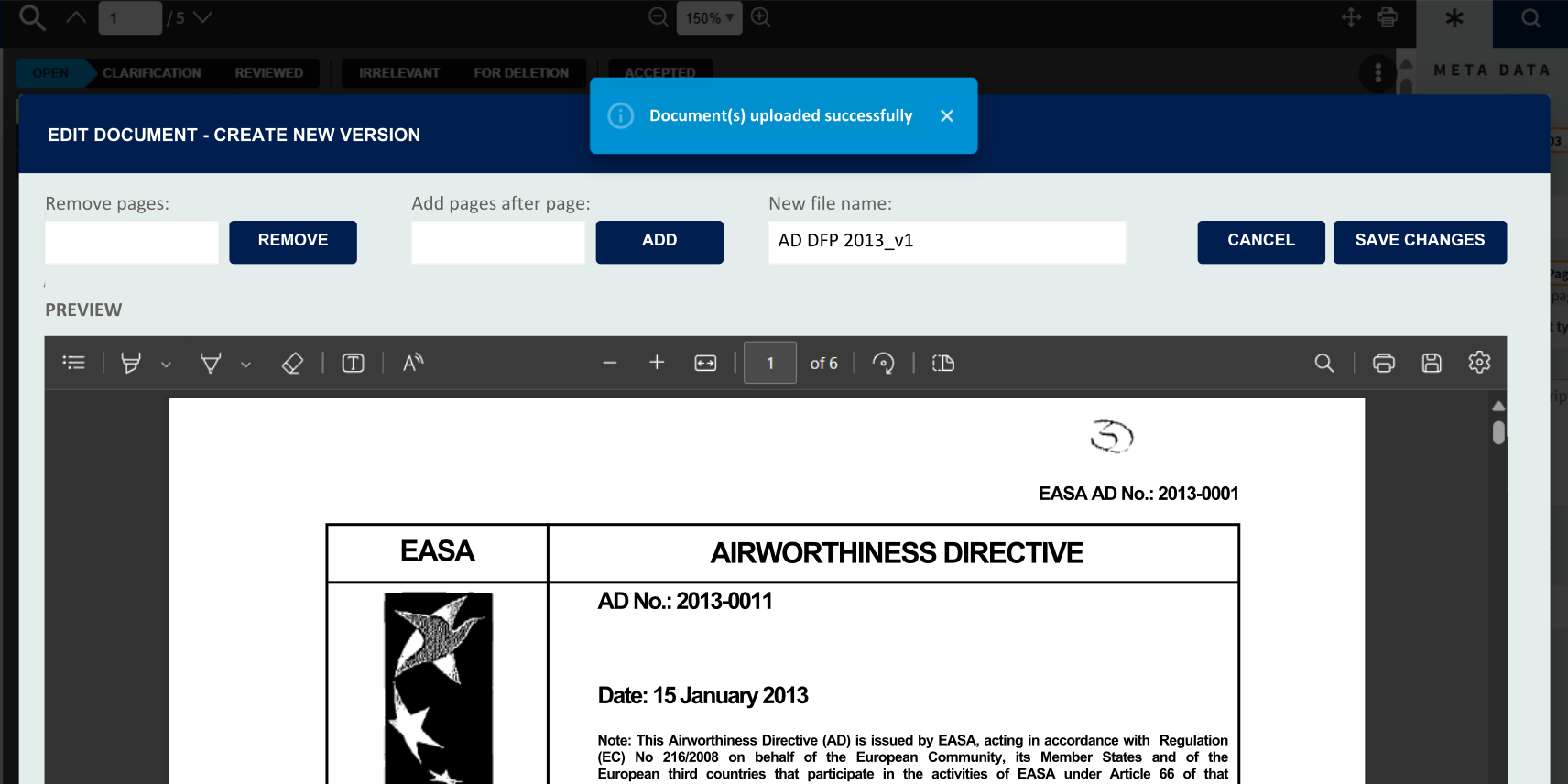
You can now edit existing PDFs inside LISA and generate new versions. Perfect for fixing missing or outdated pages or managing multiple versions of the same file. The basic functions are as follows:
➕ Add pages / documents wherever you want in your PDF
Simply select the PDF you want to add/combine with your LISA document right from your computer🗑️ Remove pages wherever you want in your PDF
Select which pages or page range you want to delete from the LISA document📝 Changing document name for the newly edited PDF
Rename the document for better transparency🔢 Adding version to each edited document
Edited documents will always receive a version reference (e.g. “Document ABC_v1”, “Document ABC_v2” etc.)Available for: Operators, Technical Specialists, and Tech Admins.
👉 To try it out, just open a PDF in LISA and select “Edit Document” from the kebab menu in the top-right corner of the viewer.
🖍️ Partially Supported: PDF Annotations
You can annotate PDFs with the editor, but for security reasons this requires downloading and re-uploading the document. Please note:
-
-
IATA delivery binder labels & versioning won’t apply automatically to annotations
-
Annotations are not saved within LISA
-
ℹ️ Important Information
-
Editing a PDF will always create a new version of the file, carrying over existing IATA delivery binder labels
-
Query information will not transfer to the new version
-
Both the original and edited PDFs will remain available
-
Users decide which version to share externally in final binders
-
What’s Next for LISA?
- We’re already working on more improvements, including:
- Infrastructure upgrades for performance & security
- New query list types for external parties
- Enhanced search, display, and filter options
- Improved release note visibility
- Aircraft status list management
- Better records sharing & downloading
- Additional user access roles
- Various quality-of-life improvements
Stay tuned for more updates and exciting features!